
The recent explosion in the price of Bitcoin and other cryptocurrencies has inspired me to start a new hobby: helping people recover lost Bitcoin wallets.
As might be expected of early adopters in an anonymous Internet cryptocurrency, many of my customers are information security professionals. It seems that many of them set up so many security measures that they locked themselves out of their Bitcoin. On the other hand, I’ve also heard from many more people who lost their Bitcoin or had it stolen because they either did not follow basic security practices, or followed them without understanding their implications, and also lost their coins. The inherent balance in information security is that you need walls in place to protect against threats, but the walls you put up to protect yourself can lock you out of you forget your way in.
I, therefore, want to suggest a list of steps that you can take right now to secure your crypto stash. These measures should be both comprehensive enough to keep you safe without being so complicated that you will be locked out of it, or tempted to disable security altogether.
This is a practical Bitcoin security guide: ten essential practices (plus a bonus) to secure your Bitcoin from theft, loss, and your own mistakes. It was first written in December 2017 and updated in September 2026; where the tools have changed since then, I say so inline.
How to secure your Bitcoin: the short version
If you only read one section, read this one. Nearly every lost-wallet case I have worked on comes down to one of these being skipped:
- Write down your recovery seed, check it twice, and keep it offline in a safe place.
- Keep your coins on a hardware wallet, or at minimum an encrypted software wallet.
- Encrypt the hard drive of any computer that touches your wallet.
- Lock the machine when you step away and disable automatic login.
- Use a password manager and turn on multi-factor authentication for every exchange and email account.
- Keep your operating system updated and do sensitive operations offline, in a private browser window.
- Automate full-system backups so the wallet file is never the only copy.
The rest of this article explains each practice, why it matters, and how I apply it myself.
1: Store your wallet seed somewhere safe
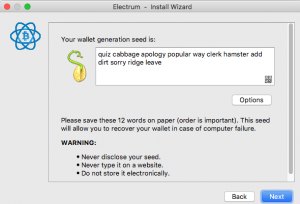
People come to me when they lose their Bitcoins any number of ways, but the one common element in their stories is that they failed to save their recovery seed. Most modern wallets ask you to save your recovery seed/mnemonic phrase somewhere safe when you set up your wallet. You can keep it in a safe place (such as an actual safe) or an encrypted flash drive (I use VeraCrypt). Triple-check both the words and the word order, as one person I worked with wrote down his seed incorrectly and lost all of his coins.
2026 update: paper fades, burns, and floods. For anything you would be upset to lose, stamp or engrave the seed on a metal backup plate and keep a second copy in a different building. If you add a BIP39 passphrase (the optional "25th word"), back it up separately from the seed and test the restore on a fresh device before you fund the wallet. A passphrase you cannot reproduce exactly is a permanent lockout, and that is now one of the most common reasons people contact me.
2: Use a hardware wallet, or a strongly encrypted software wallet
A hardware wallet (an electronic device dedicated to storing Bitcoin) such as a Trezor or Ledger is the safest place for your Bitcoin. The private keys never leave the device, so malware on your computer cannot sign a transaction without you pressing the button. Buy directly from the manufacturer, never from a marketplace reseller, and never use a device that arrives with a seed already written down for you.
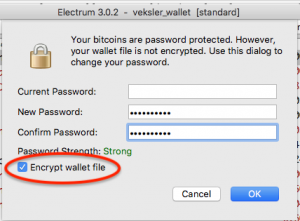
If you don’t use a hardware wallet, use a wallet which supports strong encryption. The JAXX wallet, for example, can be easily hacked and your coins stolen. I use the Electrum wallet, which allows me to encrypt my wallet file.
3: Encrypt your hard drive
Encrypting your whole hard drive is essential if you don’t want anyone with physical or virtual access to your computer to be able to extract all of your data. Modern versions of Windows and macOS make this easy.
If you have a Mac, encrypt your hard drive with FileVault. If you have Windows, you can use BitLocker to do the same thing. Personally, I do not use Windows to make any Bitcoin transactions because securing the operating system is too cumbersome, specifically because of the steps below.
4: Set a firmware password
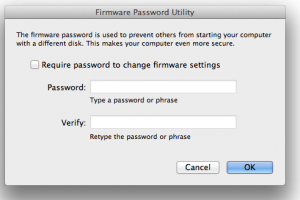
Apple computers allow you to set a firmware password which prevents your computer from being accessed without your password or using an external device. This is an additional security measure which makes your computer a lot less useful to thieves as it requires a visit to an Apple store and a proof of purchase to reset it. While older Apple computers had some simple workarounds to disable the firmware lock, modern ones are much more difficult for criminals to unlock. On Apple silicon Macs the firmware password has been replaced by the Secure Enclave and the recovery lock in Startup Security; the goal is the same.
5: Automatically lock your computer when you’re away
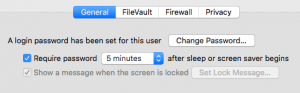
Hard drive encryption will not help you if someone installs a keylogger when you’re away from your keyboard. Set your computer to auto-lock after a few minutes AFK. Mine is set to auto-lock after five minutes
Here are instructions for Windows and Mac. I also have a “panic button” via a Touch Bar customization which locks my screen on command. I use it whenever I walk away to get coffee, go to the bathroom, etc.
6: Disable automatic login
Locking does no good if your computer logs in as you when you turn it on. Make sure auto login is disabled.
7: Use a password manager
I use a password manager to store the over 600 passwords of every service I use. I generate a new, strong password for each service I use it with it.
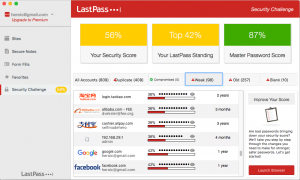
A good password manager will offer to import and audit all your passwords. My score was not great at first because, like everyone else, I used the same password for most sites before I started using a password manager. The vault is encrypted using a master password, which for me is a quasi-random list of words which I don’t use for any other purpose.
2026 update: in 2017 I used LastPass, which is what the screenshot below shows. After LastPass disclosed in late 2022 that attackers had copied customer vaults, I moved to Bitwarden; 1Password is the other one I recommend. Whichever you choose, the rule that matters is the same: never store a wallet seed phrase or private key in the password manager. It is for account passwords, and the vault is exactly the kind of high-value target that gets attacked.
However, even if someone gained access to my password manager credentials, they would not access any of my important services because I also use the following step.
8: Enable multi-factor authentication
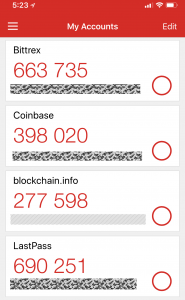
I use an authenticator app in combination with other passwords to access all my important accounts. Multi-factor authentication apps work by cycling a code every 30 seconds which must be entered in addition to the password to access a service. For some services, I also have a physical security token (my Trezor wallet does this, but most people use a YubiKey) which must be physically plugged into my computer to access a site.
2026 update: do not use SMS text messages as your second factor for an exchange or for the email account that can reset your exchange password. SIM-swap attacks, where a thief convinces your carrier to move your phone number to their SIM, are the standard way crypto accounts get taken over. Use an authenticator app or a hardware security key, and set a port-out PIN with your mobile carrier.
9: Keep your computer up to date
Mac OS had a nasty root access bug a few weeks before this was written. Keep your OS up to date to protect against the latest threats.
10: Use private, offline mode for sensitive operations
I occasionally need to create a paper wallet or perform other sensitive operations in my web browser. This has two risks:- The web page may have malicious code which leaks my keys.
- One of my browser extensions may have malicious code (this happened to me a few month ago).
Furthermore, I perform any paper wallet operations with ethernet/Wifi disabled. This prevents malicious code in the wallet from secretly sending your Bitcoin keys to a third party. I then completely quit my web browser before going back online. I also download any browser-based crypto software directly from GitHub rather than random websites.
Bonus. 11: Set up automatic backups
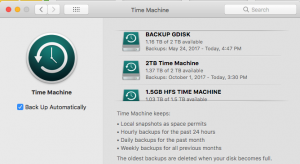
I’ve set up my MacBook for triple-redundant encrypted hourly backups with Apple Time Machine. This is not nearly as easy with Windows. CrashPlan (available on Windows and Mac) allows encrypted backup to local storage devices. Windows has a built-in backup app, but it’s not nearly as simple or powerful as Time Machine.
While this is not strictly security advice, automating your backups is important from a security perspective. I’ve noticed that people who are not 100% confident in their backups tend to backup important files over flash drives, work computers, email, DropBox, and other services where it is at risk of theft. Some of my clients thought they’d backed up their wallet, but couldn’t figure out which of the 10 flash drives they had actually held their Bitcoins years later. A complete system backup will allow you to restore both the wallet file and the software you used to open it.
Where people actually lose their Bitcoin
After years of recovery work, the pattern is clear. Thefts by sophisticated hackers are rare. The common cases are a seed phrase written down wrong or never written down at all, a wallet password forgotten after years of not touching the coins, a passphrase added "for extra security" and then lost, a phone number hijacked to reset an exchange login, and a seed typed into a fake wallet site that showed up in a search ad. Every one of those is covered by the practices above. If you are already past that point, my wallet recovery service has helped people recover wallets from partial seeds, forgotten passwords, and old drives; for a broader look at how individuals and institutions hold coins, see the introduction to cryptocurrency custody options.
Frequently asked questions
What is the safest way to store Bitcoin?
A hardware wallet whose recovery seed is written on paper or stamped in metal and stored somewhere physically secure, ideally in two separate locations. For larger holdings, add a BIP39 passphrase or use a multisignature setup so that no single device or piece of paper can lose or leak everything.
Should I store my seed phrase in the cloud, in email, or as a photo?
No. A seed phrase in a cloud drive, an email, a notes app, or a phone photo is only as secure as that account's password, and those accounts are the first thing attackers go after. Keep the seed offline. If you must keep a digital copy, put it inside an encrypted container such as a VeraCrypt volume, never as plain text.
Is a hardware wallet enough on its own?
It protects your private keys from malware on your computer, which is the most common way software wallets get drained. It does not protect you from losing the recovery seed, from typing the seed into a phishing site, or from buying a tampered device. Buy directly from the manufacturer, back up the seed properly, and never enter the seed anywhere except the device itself.
What should I do if I lost my seed phrase or wallet password?
Stop trying random guesses on a hardware wallet, since repeated failures can wipe the device. Gather every backup, old drive, and partial note you have, then have a professional wallet recovery service such as walletrecovery.info assess whether the remaining material is enough to brute-force the password or reconstruct the seed.